Categories
- Packaging Boxes
- Folders Printing
- NCR Printing
- Greeting Cards Printing
- Calender Printing
- Sticker Printing
- Label Printing
- Tag Printing

Archives
- November, 2026
- October, 2026
- September, 2026
- August, 2026
- July, 2026
- June, 2026
- May, 2026
- April, 2026
- March, 2026
- February, 2026
- January, 2026
- December, 2025
- November, 2025
- October, 2025
- September, 2025
- August, 2025
- July, 2025
- June, 2025
- May, 2025
- April, 2025
- March, 2025
- February, 2025
- January, 2025
- December, 2024
- November, 2024
- October, 2024
- September, 2024
- August, 2024
- July, 2024
- June, 2024
- May, 2024
- April, 2024
- March, 2024
- February, 2024
- January, 2024
- December, 2023
- November, 2023
- October, 2023
- September, 2023
- August, 2023
- July, 2023
- June, 2023
- May, 2023
- April, 2023
- March, 2023
- February, 2023
- January, 2023
- December, 2022
- November, 2022
- October, 2022
- September, 2022
- August, 2022
- July, 2022
- June, 2022
- May, 2022
- April, 2022
- March, 2022
- February, 2022
- January, 2022
- December, 2021
- November, 2021
- October, 2021
- September, 2021
- August, 2021
- July, 2021
- June, 2021
- May, 2021
- April, 2021
- March, 2021
- February, 2021
- January, 2021
- December, 2020
- November, 2020
- October, 2020
- September, 2020
- August, 2020
- July, 2020
- June, 2020
- May, 2020
- April, 2020
- March, 2020
- February, 2020
- January, 2020
- December, 2019
- November, 2019
- October, 2019
- September, 2019
- August, 2019
- July, 2019
- June, 2019
- May, 2019
- April, 2019
- March, 2019
- February, 2019
- January, 2019
- December, 2018
- November, 2018
- October, 2018
- September, 2018
- August, 2018
- July, 2018
- June, 2018
- May, 2018
- April, 2018
- March, 2018
- February, 2018
- January, 2018
- December, 2017
- November, 2017
- October, 2017
- September, 2017
- August, 2017
- July, 2017
- June, 2017
- May, 2017
- April, 2017
- March, 2017
- February, 2017
- January, 2017
- December, 2016
- November, 2016
- October, 2016
- September, 2016
- August, 2016
- July, 2016
- June, 2016
- May, 2016
- April, 2016
- March, 2016
- February, 2016
- January, 2016
- December, 2015
- November, 2015
- October, 2015
- September, 2015
- August, 2015
- July, 2015
- June, 2015
- May, 2015
- April, 2015
- March, 2015
- February, 2015
- January, 2015
- Show All

- Free online proofs
- Fast turnaround
- Secure checkout
November 14, 2026
Why do printed calendars work so well?
A calendar is one of the few marketing items people actively want to keep. It hangs on a wall or sits on a desk and is looked at several times a day, so your brand stays visible for twelve months instead of a few seconds. That repeated exposure builds familiarity, and familiarity builds trust when a customer is ready to buy.
Calendars also give you more space than most promotional items. You can show your logo, contact details and a different image or message on every page. Our posts on three ways to get good calendars and creative calendar design show how businesses use that space well.
Which calendar format should you choose?
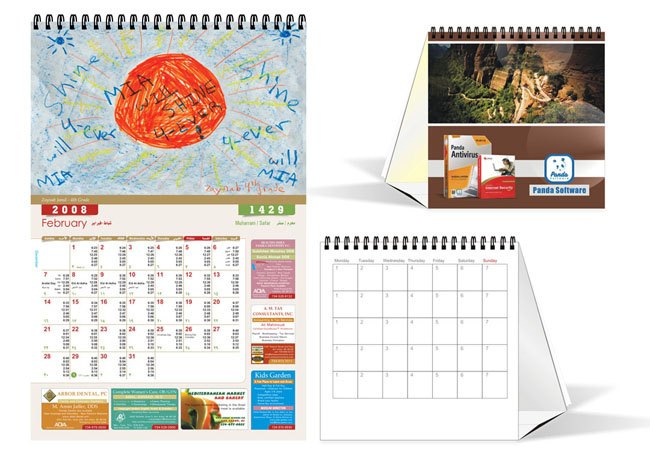
PrintingView offers several calendar formats on the calendar printing page:
| Format | Best for |
|---|---|
| 1-page calendar | Giveaways and mailers. The whole year on a single sheet is easy to hang in an office, kitchen or workshop. |
| 6-page calendar | A balance of space and cost. Two months per page gives room for photos and notes. |
| 12-page calendar | Premium gifts for loyal customers. A full page for each month lets you tell a story through the year. |
Think about where the calendar will be used. A one-page calendar suits a quick reference at a desk, while a twelve-page wall calendar works as a feature piece in a reception area or home.
When should you start planning?
Calendars are time-sensitive, so a simple schedule keeps you ahead. A realistic plan looks like this:
- Two to three months before the new year: decide the format, theme and quantity.
- Ten weeks before: collect images, dates and text.
- Eight weeks before: finish the design and send artwork.
- Six weeks before: approve the free digital proof.
- Four weeks before: printing and delivery.
- Two weeks before: start handing out or mailing calendars.
Starting early also gives you time to correct date or spelling errors, which are the most common reason for reprints.
How do you design a calendar people keep?
- Make the dates easy to read. Use a clear typeface and a large enough grid so people can write notes.
- Put your brand where it will be seen. Place the logo and contact details in the same spot on every month, usually in the header or footer.
- Use strong images. Choose sharp, high-resolution photos of your work, your team or local scenes. Images should be at least 300 DPI at print size.
- Stay on brand. Match colours and fonts with your business cards, brochures and website.
- Leave a space for the hanging hole. Keep artwork and text clear of the area where the calendar hangs.
- Check every date. Confirm weekdays, public holidays and leap-year dates against a reliable source before sending artwork.
What should go on each month?
Dates are the main content, but a few extras make calendars more useful and more memorable:
- Local holidays, school dates or industry events that matter to your customers.
- A short tip, offer or fact about your products for each month.
- A “customer of the month” or featured project to build community.
- A QR code that links to a booking page, discount or contact form.
- Seasonal reminders, for example when to order holiday packaging or gifts.
If your business sells printed products, link months to useful reminders, such as ordering greeting cards before a holiday or flyers before a seasonal sale.
How do you distribute calendars?
- Include a calendar with every order in the last quarter of the year.
- Mail them to loyal customers with a handwritten note in a branded envelope.
- Hand them out at your shop, events or community boards.
- Send a small batch to partners and suppliers, since they see your brand all year.
Track the results by adding a unique offer code or QR link to the calendar. That shows how many customers respond. Our post on branding with different printing services explains how calendars fit into a wider print strategy.
Common calendar printing mistakes
- Ordering too late and missing the start of the year.
- Wrong dates or missing holidays.
- Low-resolution photos that look blurry on the wall.
- Too much text that hides the actual calendar grid.
- No contact details on every page.
Calendar printing FAQ
How early should I order custom calendars?
Start planning two to three months before the new year. This leaves time to prepare artwork, approve a proof, print, and distribute the calendars before the year starts.
What is the best calendar size for a business?
A one-page calendar suits giveaways and quick reference, a six-page calendar offers more space for photos, and a twelve-page calendar is ideal for premium gifts that feature a different image each month.
Are printed calendars still effective for marketing?
Yes. Calendars are used daily and stay on display for a full year, so they keep your name, logo and contact details in front of customers far longer than most promotional items.
What image quality do I need for calendar printing?
Use photos that are at least 300 DPI at the printed size, saved in CMYK if possible. Low-resolution or small web images will look blurry when printed large.
Can I add my own dates and events to a calendar?
Yes. You can mark company events, local holidays, product launches or anniversaries on the calendar grid, which makes it more useful and personal to your customers.
How do I check if my calendar design is ready to print?
Check every date and weekday, confirm images are high resolution, keep text inside the safe area and review the free digital proof carefully before you approve it.
